🛡️ GTMods Verified Working Mod (2026)
- Status: Verified Working on Gorilla Tag Unity 2022.3 LTS
- Platform: PCVR (SteamVR, Oculus Link, Virtual Desktop)
- Safety Scan: Clean (0/72 VirusTotal Detections)
- Installation: Requires BepInEx v5.4.21+ via Monke Mod Manager
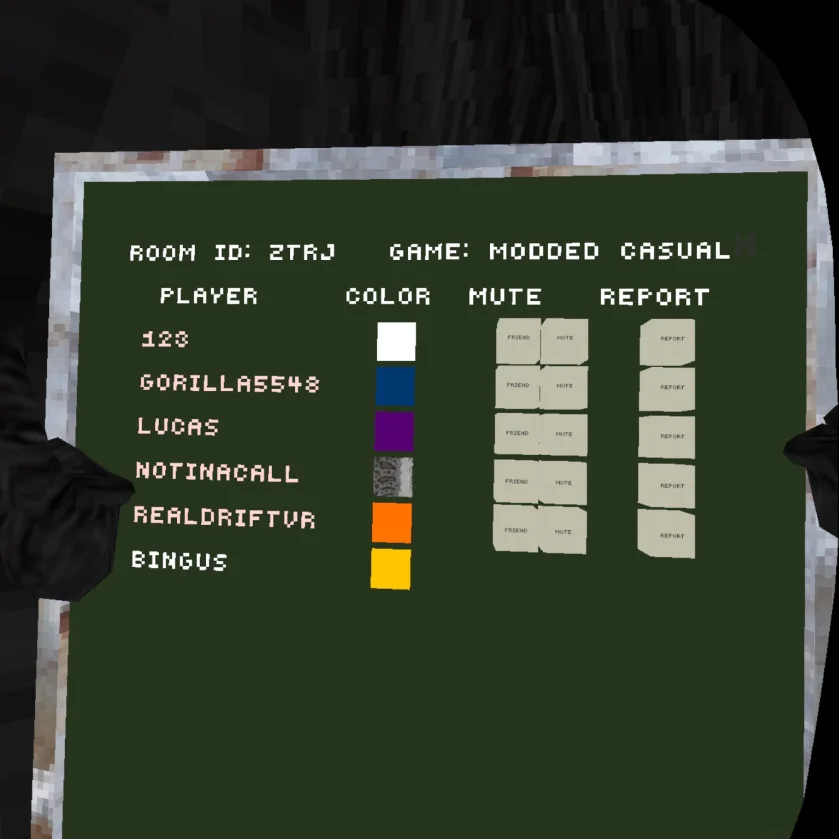
On the Meta Quest version of Gorilla Tag, you can open a report menu anywhere. On PCVR (Steam), you usually have to run back to the stump. The Oculus Report Menu mod fixes this.
It lets you spawn the leaderboard right in front of you. This is useful for reporting rule-breakers instantly. It works on SteamVR and Oculus Rift.
We have the latest version (v2.3.1) which fixes hand bugs and movement issues.
What Does This Mod Do?
This mod brings the “Portable Leaderboard” feature to PC.
- Report Fast: Spawn the menu to report toxic players without chasing them.
- Quest Parity: It looks and acts exactly like the Quest report menu.
- Movement Lock: When the menu is open, your gorilla stops moving. This makes it easier to click buttons.
- Toggle: Open and close it with a simple button combination.
Mod Controls
By default, the keybinds are set to match the standard shortcut.
- Open/Close Menu: Hold Left Secondary + Right Secondary (Usually X and A).
- Alternative Default: Some versions use Right Stick Click (RJ) + Left Secondary (LS).
- Interaction: Use your finger to tap the buttons on the floating screen.
Note: You can close the menu by pressing the same buttons again.
How to Customize Keybinds
Don’t like the buttons? You can change them in the config file.
- Run the game once after installing the mod.
- Go to
BepInEx/config/OculusReportMenu.cfg. - Open it with Notepad.
- Change
openButton1andopenButton2.
Valid Button Codes:
| Code | Button | Code | Button |
| LP / RP | Primary (Y/B) | LS / RS | Secondary (X/A) |
| LG / RG | Grip | LT / RT | Trigger |
| LJ / RJ | Stick Click | NAN | No Button |
Example: To open with just Left Trigger, set openButton1 = LT and openButton2 = NAN.
Download Oculus Report Menu
| Mod Name | Oculus Report Menu |
| File Size | 5.11 KB |
| Updated On | February 16, 2026 |
How to Install
- Download: Get the
OculusReportMenu.dllfile. - Locate Folder: Go to your Gorilla Tag folder >
BepInEx>plugins. - Copy File: Drag the downloaded file into the plugins folder.
- Launch: Start the game and test the keybinds.
If you don’t know how to find these folders, read our guide on How To Get Mods On Gorilla Tag.
Frequently Asked Questions
Does this work on SteamVR? Yes. Even though it is called “Oculus Report Menu,” it works perfectly on SteamVR.
Why can’t I move? When the menu is open, the mod locks your movement. This is a feature, not a bug. It helps you click the report buttons accurately. Close the menu to move again.
Can I change the sensitivity? Yes. In the config file, look for Sensitivity = 0.5. You can lower or raise this number if the buttons feel unresponsive.
Conclusion
This is a must-have tool for moderation. It keeps the game safe by letting you report bad actors quickly.
Download it today and clean up your lobbies.
You can also try our Walk Simulator Mod to Play with Keyboard and Mouse.